


Live Scores : NFL NCAA NBA MLB
4.1116.00 Reviews
App Specs
- Version
- 1.0.2
- Updated On
- License
- Free
- Downloads
- 50,000+
- Developer
- Biogi Live
- Categories
- Sports
- Platform
- Android
Screenshots
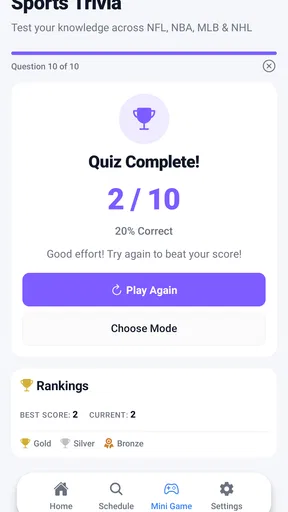
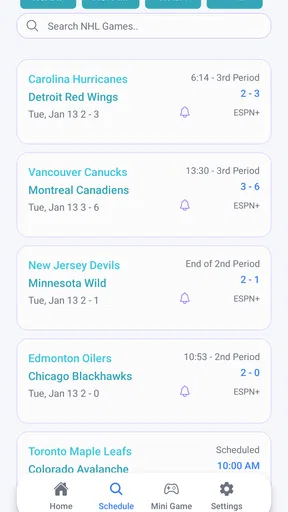
 Analysis by AppCompare
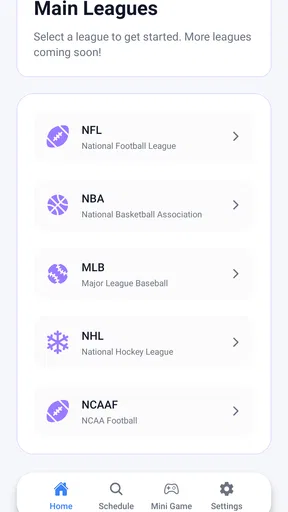
I tried Live Scores : NFL NCAA NBA MLB as a straightforward sports companion rather than as a full replacement for every league-specific service. Its purpose is easy to understand: keep live scores and game streams for NFL, NCAA, NBA, MLB, and NHL in one place. That focus makes it appealing when I want a quick update without moving between several apps, but it also means the quality of the experience depends heavily on how much detail and control I expect from a sports app.
Developed by Biogi Live, this free sports app is aimed at a broad audience and carries an Everyone age rating. It is available for devices running Android 7.0 or later, so it can suit people who keep an older phone in daily use. The current version is 1.0.2, and the app has already passed the early stage of being used only by a handful of people: it has over 50 thousand installs, with an average rating of 4.1 from around 482 ratings. Those figures suggest a generally positive first impression, while also leaving room for the kind of rough edges I noticed when judging it from a practical, everyday perspective.
How clearly the app presents live sports
I find that the app’s most useful idea is bringing live sports scores for several leagues into one place. That can make a quick check easier when my interests cross from one sport to another, but the value depends on how clearly the information is organized. In the next section, I look at how that score-first approach fits different ways of using a phone.
A quick route to the score that matters
The strongest part of the concept is the broad league coverage. NFL, NCAA, NBA, MLB, and NHL followers often have different habits, but they share the same basic need: find out what is happening now. A single app can reduce the mental effort of remembering which service covers which competition. I found that especially useful on busy days when I was following more than one sport and did not want to build a separate routine around each league.
The short store description is simply “Live Scores,” and that plain wording matches the app’s most obvious role. I would open it when I needed a fast answer rather than a long article, a social discussion, or an elaborate statistical breakdown. That distinction is important. Someone looking for a compact scoreboard can appreciate the direct purpose, while a fan who wants deep historical analysis may find the experience less satisfying than a dedicated league platform.
For readability, the most useful habit is to decide before opening the app what I am checking. If I only need to know whether a team is winning, a compact score-focused view is less tiring than browsing through commentary and promotional material. If I am switching between basketball and baseball, I take an extra moment to confirm the sport before acting on the information, because the meaning of a score changes considerably between innings, quarters, and periods.
Navigation that works best when I keep the task small
I think of this app as a “check and leave” tool. I open it, locate the competition, identify the game, and close it again. That workflow is more comfortable than trying to use it as a constant background dashboard. It also helps users who find dense screens difficult to process: one small task at a time is easier than scanning every available league at once.
Worth Reading Before You Choose

Flipboard Shows What News Apps Must Do Beyond the Feed

Switching to Android Auto Means Rethinking Your Driving Routine

Google Calendar Makes a Crowded Week Easier to Manage

Ludo King Makes the Most of the Minutes Between Plans

Baby Panda World Brings Quick Play to Modern Phones, but Its Game Library Feels Busy

ESPN’s Live Game View Makes Following Close Games Easier
The five sports covered here create useful variety, but they can also create visual and cognitive load. A person who follows only college football may not want to sift through professional basketball or hockey listings. Conversely, a multi-sport household may value the range precisely because it avoids installing a separate app for each interest. The right choice depends on whether breadth feels like convenience or clutter.
My practical tip is to use a consistent checking routine. I start with the sport I care about most, then move to another league only if I have a reason. This is particularly helpful for readers who have attention difficulties, use a small display, or are checking the app while commuting. It turns a broad catalog into a predictable sequence instead of an open-ended search.
Streams change the role of the app
Scores are passive information: I can glance at them and continue what I was doing. Streams demand more attention, and that difference matters for accessibility. A live stream can be useful when I cannot reach a television or another viewing service, but it may also introduce more sensory stimulation than a simple score screen. I would choose the score view when I am in a quiet workplace, a waiting room, or any situation where watching moving content is impractical.
The presence of streams also makes the app more interesting for fans who want to stay with a game rather than merely check its result. Still, I would not assume that a stream is automatically the best option for every user or every environment. A person with limited data, hearing-related needs, visual fatigue, or a strict time limit may prefer a brief score check. The useful trade-off is flexibility: the app can serve a quick glance or a longer session, but I would select the mode deliberately.
Readable use across different abilities
Clear sports information is not only about large text. It is also about predictable grouping, enough contrast, understandable labels, and not forcing the reader to remember too much from one screen to the next. In my use, the app makes the most sense when I treat each game as a separate information unit. That approach reduces the chance of confusing a basketball score with a baseball score or overlooking the competition attached to a team name.
People with low vision may still prefer to enlarge the device interface or use the phone’s built-in reading and magnification tools where available. I would test those settings with the app before depending on it during a major game. The practical question is not simply whether I can see the score, but whether I can distinguish the teams, identify the sport, and understand the current state without guesswork.
Motor, sensory, and situational access in everyday use
I judge access by the small demands of an ordinary check: locating a matchup, reading its status, and deciding whether to keep watching or move on. Those demands can change with hand movement, vision, hearing, attention, and surroundings, so I consider the app in everyday situations rather than treating accessibility as a single setting. That leads into practical ways to keep a sports check manageable.
Why a score-first workflow can reduce effort
Sports apps can become frustrating when every action requires precise tapping or when animated content competes with the information I came to find. Live Scores : NFL NCAA NBA MLB is most useful to me when I keep the interaction simple: open, select the relevant sport, find the game, and read. That is a manageable sequence for someone using one hand, dealing with shaky movement, or trying to operate a phone while carrying something.
A score-checking routine also avoids unnecessary repeated actions. If I am following a game during a short break, I do not want to explore several menus before reaching the current result. My advice is to avoid tapping rapidly when a screen appears busy. Give each selection a moment to respond, then confirm that the sport and matchup are correct. That small pause prevents accidental navigation and reduces the effort of correcting a wrong choice.
For users with motor limitations, the app may be more comfortable when the phone is placed on a stable surface rather than held in the air. This is not a special feature of the app, but it changes the experience significantly. A stable phone makes small controls easier to target and lets the user concentrate on reading instead of balancing the device.
Sound, motion, and concentration
Streams can create a different sensory experience from scoreboards. Moving images, changing game action, and audio may be welcome for one user and distracting for another. I would begin with the score display in a demanding environment and only move to a stream when I have enough concentration and privacy. That is a better fit for people who are sensitive to noise, easily distracted by motion, or sharing a room with others.
In a crowded café, I would use the app as a silent score checker. On a train, I might check a game between stops rather than trying to watch continuously. At home, a stream could make more sense if I want a longer connection with the event. These are not minor differences: the same app can feel calm and efficient in one setting, then unnecessarily demanding in another.
Users who rely on captions, transcripts, audio descriptions, or other specific presentation methods should evaluate the stream itself rather than assuming that live video will provide every preferred option. I would make the score view my dependable fallback because it communicates the central result without requiring continuous listening or watching.
A realistic daily scenario
Imagine I am leaving work while an NBA game is in progress, and I also want to know whether an MLB game has started. I open the app during a permitted break, check the basketball matchup first, then move to baseball and confirm the current state. I do not need to remember two separate services, and I can stop after a few seconds. If I later have time at home, I can consider the stream instead of repeating the same search elsewhere.
That scenario shows the app’s practical strength: it compresses several small sports checks into one familiar destination. It also shows the limitation. If I need detailed play-by-play, advanced player comparisons, personalized alerts, or a carefully curated team news feed, a specialist app may be better. This product is most convincing when the main question is “What is happening right now?” rather than “Give me an entire research workspace for this league.”
Older devices and a sensible testing routine
Support for Android 7.0 or later gives the app a potentially wide device range, including older phones that newer sports products may leave behind. That is useful for people who keep an inexpensive backup phone, share a household device, or prefer not to upgrade frequently. At the same time, older hardware can make video-heavy use less comfortable than score-focused browsing.
I would test the app in the exact situation where I plan to use it. Check a score on the normal network, try moving between two sports, and see whether the text remains comfortable on the phone’s display. If streaming is important, test that separately rather than judging it from the scoreboard experience. This simple routine gives a more honest answer than relying only on the app’s general rating.
Where the remaining barriers appear
The biggest barrier is not the idea of combining leagues; it is the tension between broad coverage and focused navigation. Five major sports create a useful starting point, but they also mean that a user with one narrow interest may encounter more information than necessary. For someone with cognitive fatigue, the ideal sports app may be the one that opens directly on a chosen team or competition.
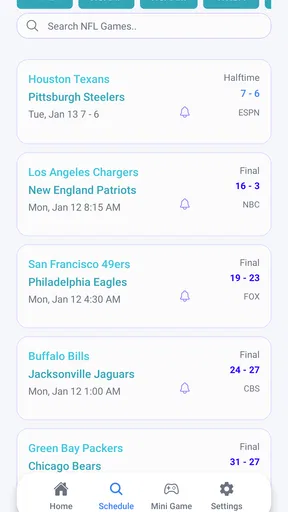
Another barrier is the difference between knowing a score and understanding it. A bare result may be enough for a casual check, but some users need context: how much time remains, whether the score is final, or what phase of the game is underway. I would verify that the display gives me the context I need before using it for serious following. If the app does not answer the question quickly enough, a league-specific alternative may provide a clearer experience.
Streaming also raises practical trade-offs. Watching a game requires more battery, attention, and network stability than reading a score. I would avoid treating the stream as the default simply because it is available. For a user on limited connectivity or with a short break, the score view is the more responsible choice. For a fan who wants sustained viewing, a dedicated broadcast service may offer a more complete and predictable setup.
People who depend on highly customized notifications should also think carefully about their priorities. A broad live-score app is convenient for checking several competitions, but a team-centered service may be more suitable when every interaction should revolve around one club or school. I would choose this app for breadth and immediacy, not automatically for personalization.
Who should use it, and who should skip it?
I would recommend it to a multi-sport fan who wants one free place to check NFL, NCAA, NBA, MLB, and NHL action. It also makes sense for casual followers who do not want a large commitment: open it when curious, read the current information, and move on. The Everyone rating and support for older Android versions make it approachable for a mixed household where not everyone uses a recent phone.
I would be more cautious about recommending it to someone who follows one team obsessively and needs deep team-specific tools. That person may get more value from a dedicated league or club service. I would also point frequent stream viewers toward a platform designed primarily for watching, especially if they need specialized viewing controls or a richer broadcast experience.
For users with accessibility needs, I would frame the recommendation around the task rather than making a blanket promise. If the goal is a short, quiet score check, the app’s focused purpose can reduce effort. If the goal involves continuous video, complex statistics, or highly individualized presentation, I would test it personally and keep an alternative available. The most inclusive way to use it is to match the simplest view to the situation.
My inclusive verdict after using it
Live Scores : NFL NCAA NBA MLB is a useful free sports app when convenience means bringing several major competitions into one place. I like its clear central idea and the way it can support small, repeatable checks throughout the day. Its value is strongest for people who want current sports information without committing to a single league or installing a separate tool for every interest.
I would not describe it as a universal solution for every sports fan or every accessibility situation. The broad coverage can require extra filtering, streams can be more demanding than scores, and users who need deep personalization may prefer a specialist alternative. Those are important limitations, but they do not cancel out the app’s practical role.
My final recommendation is to start with a score-only workflow, use one sport at a time, and test the display on the device you actually depend on. Move to streaming only when your surroundings, connection, and attention make it comfortable. For me, that makes Biogi Live’s app a sensible companion for quick multi-league updates, especially when the priority is readable, low-effort access to live sports rather than an all-in-one destination for every advanced fan feature.
Pros
- Covers major U.S. leagues in one lightweight app
- Quick score updates help users follow games on the go
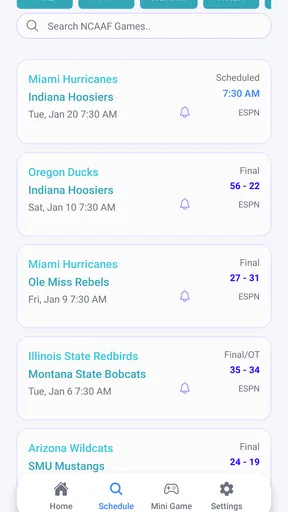
- Useful for checking schedules across different sports
- Simple layout makes recent results easy to find
- Helpful for fans tracking multiple teams throughout the season
Cons
- May offer limited coverage for international leagues and competitions
- Frequent alerts can become distracting without careful settings
- Some advanced statistics may require extra navigation
- Ad-supported screens may reduce the overall viewing comfort
- Information can feel basic compared with dedicated league apps
FAQs for Live Scores : NFL NCAA NBA MLB
What is Live Scores: NFL NCAA NBA MLB?
Live Scores: NFL NCAA NBA MLB is a sports-tracking app designed for fans who want quick access to scores, schedules, results, standings, and game updates. It focuses on major American sports, including the NFL, NCAA football, NBA, and MLB. The app is useful for checking several leagues in one place instead of visiting separate sports websites or installing multiple applications.
Which sports and competitions are covered by the app?
The app primarily covers the National Football League, NCAA college football, National Basketball Association, and Major League Baseball. Depending on the version and available data services, coverage may include regular-season games, playoffs, championships, team schedules, standings, and completed results. Users should check the current app description because league availability, statistics, and competition coverage can change after updates.
Does Live Scores: NFL NCAA NBA MLB provide real-time scores and notifications?
The application is intended to provide live or near-real-time game information, allowing users to follow scores while matches are in progress. Some versions may also offer game reminders, status updates, or notifications for selected teams and events. Delivery speed can depend on the data provider, internet connection, device settings, and whether notifications are enabled in both the app and the phone system.
Is Live Scores: NFL NCAA NBA MLB free to download and use?
The app may be available as a free download, but users should review its store listing for advertising, optional purchases, subscriptions, or premium features. Free access does not always mean every function is unrestricted. Before installing, check the current pricing information, payment terms, and cancellation policies, particularly if the app offers enhanced statistics, an ad-free experience, or additional notification options.
What permissions and internet connection does the app require?
Because scores and schedules are retrieved from online services, Live Scores: NFL NCAA NBA MLB generally requires an internet connection for current information. It may request notification permission so it can send game alerts, while other permissions depend on the platform and app version. Review the privacy policy and permission prompts carefully, and avoid granting access that does not seem necessary for the features you plan to use.


